
Catch the Tooth Fairy on camera, in your child's own room
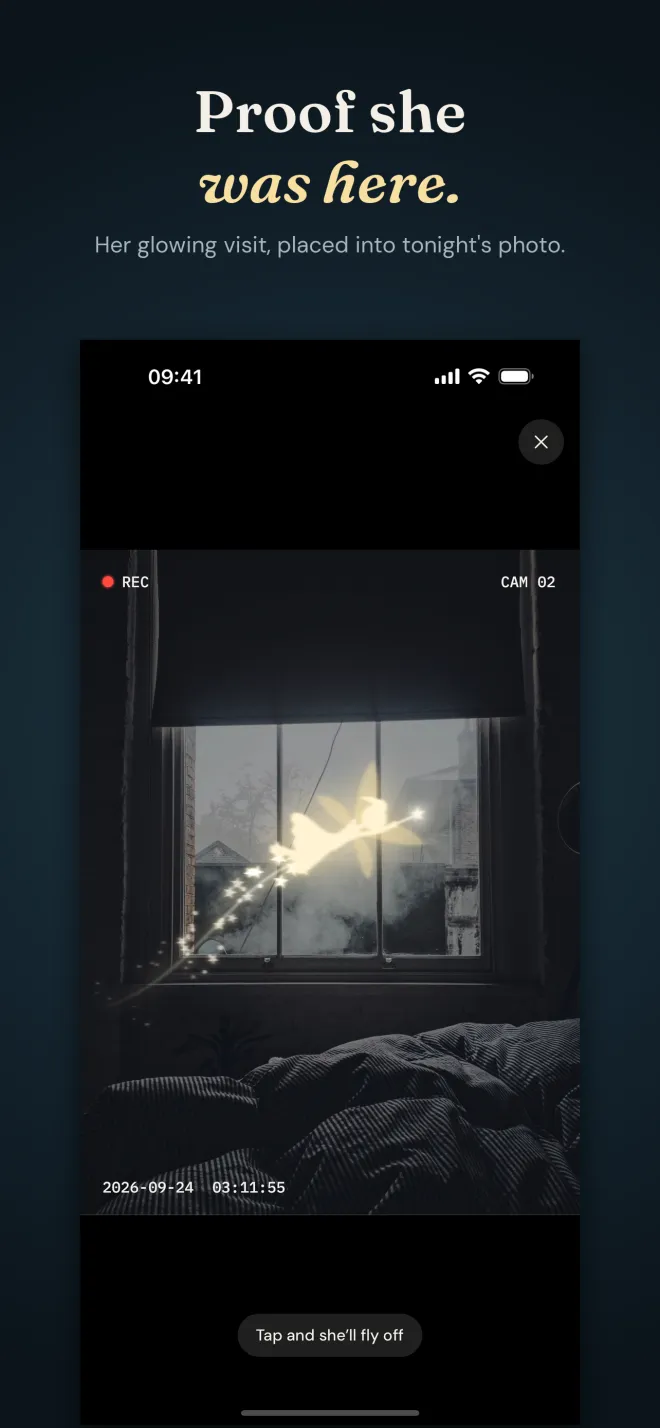
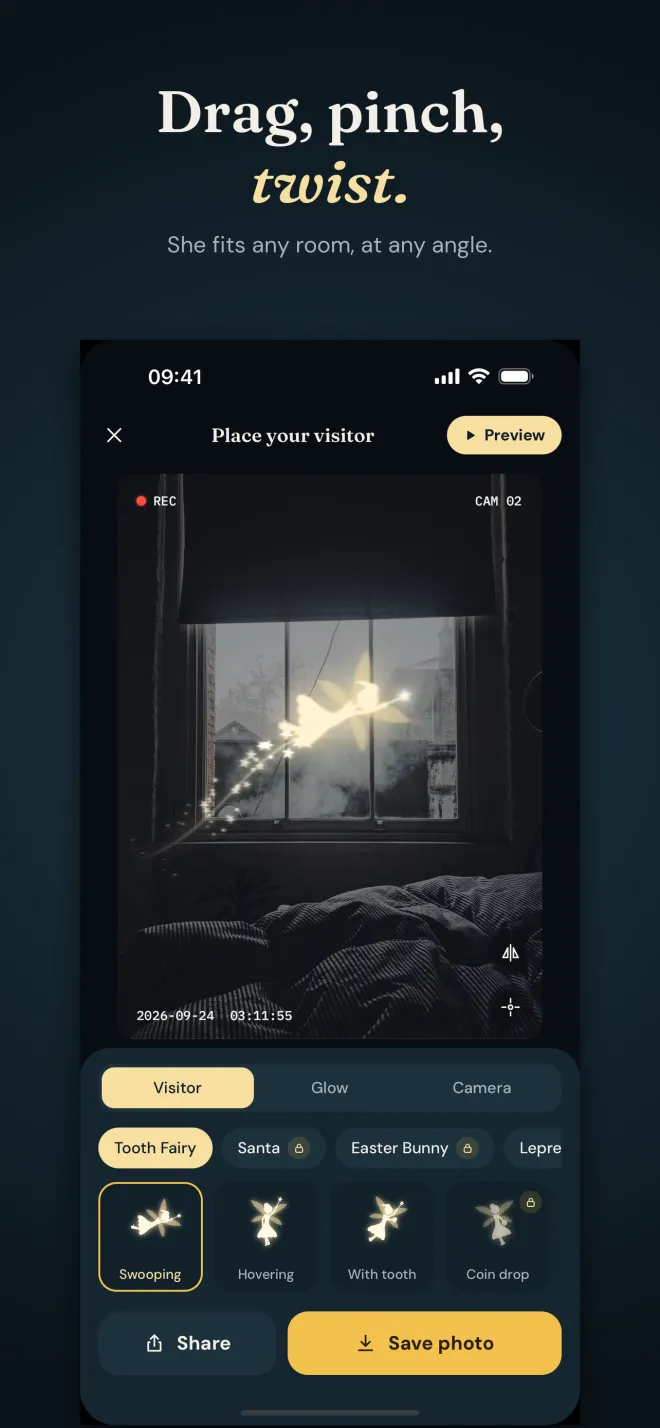
Tooth Fairy Cam is an iPhone app that places a glowing Tooth Fairy into a photo of your child's bedroom, so it looks like a camera caught her visit. Take a photo after lights out or pick one you already have, then drag her into place, pinch to resize, twist to turn and flip which way she flies. A soft light and a trail of sparkle dust spill into the room around her, so she looks like part of the picture instead of a sticker. Add a green night-vision look with a REC light, a camera number and a timestamp in the small hours, then save it or play Preview, where she streaks across the screen and darts off when your child taps. The app also keeps a tooth map for each child and writes a note back in her handwriting. Photos never leave your iPhone.
- Price
- Free download. One-time unlock (US $3.99)
- Free
- Tooth Fairy in 3 poses, night vision, tooth map, letters
- Unlock adds
- Santa, Easter Bunny, Leprechaun, Christmas Elf, receipts, certificates
- Languages
- 15, with handwriting in each script
Screenshots
How to catch the Tooth Fairy on camera
Do it after your child is asleep. The whole thing takes a few minutes, and the photo is ready for breakfast.
- Photograph the roomTake a photo of the bedroom after lights out, ideally from where a hidden camera might sit, or pick a photo you already took.
- Place the Tooth FairyDrag her anywhere, pinch to resize, twist to turn and flip which way she is flying. Near a window, a lamp or the pillow works well.
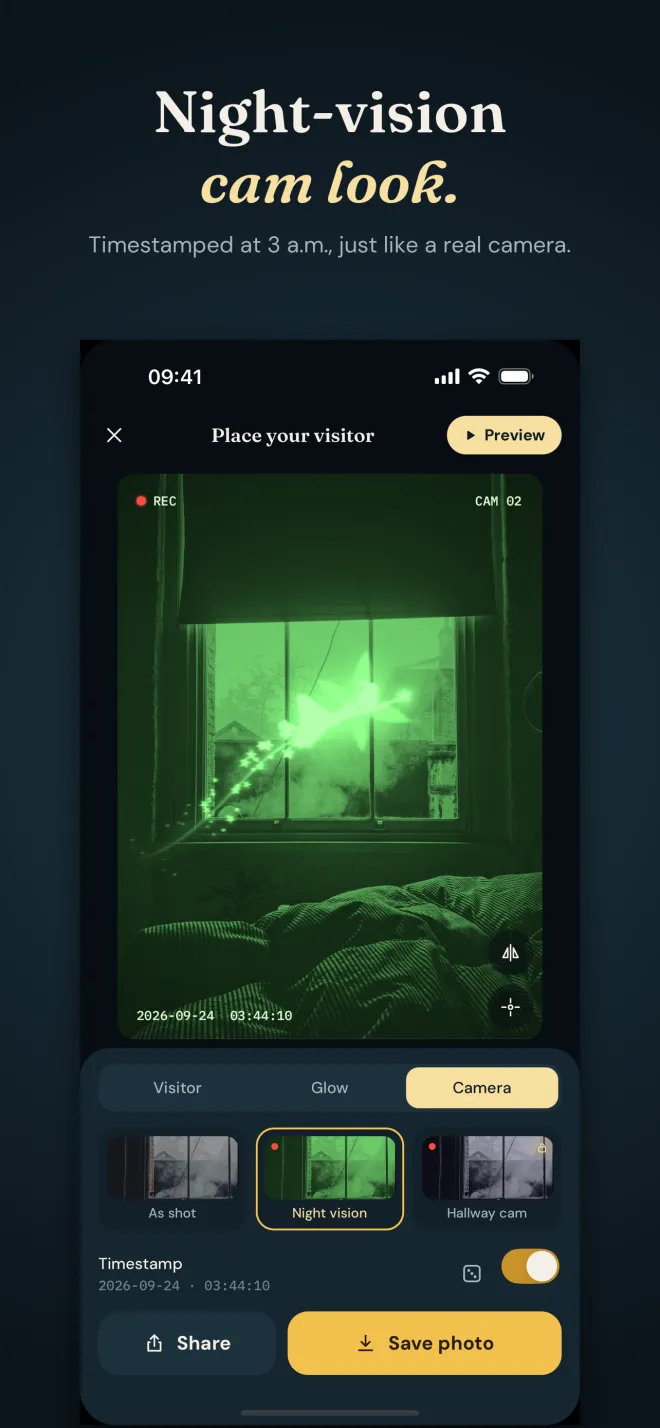
- Make it look like a real cameraChoose the Night vision look for green night-camera footage with film grain, a REC light, a camera number and a timestamp in the small hours. Tune the glow, trail length and motion blur.
- Save it, or show it liveSave the photo to Photos or share it. In Preview she streaks in across the full screen, hovers, and darts off when your child taps.
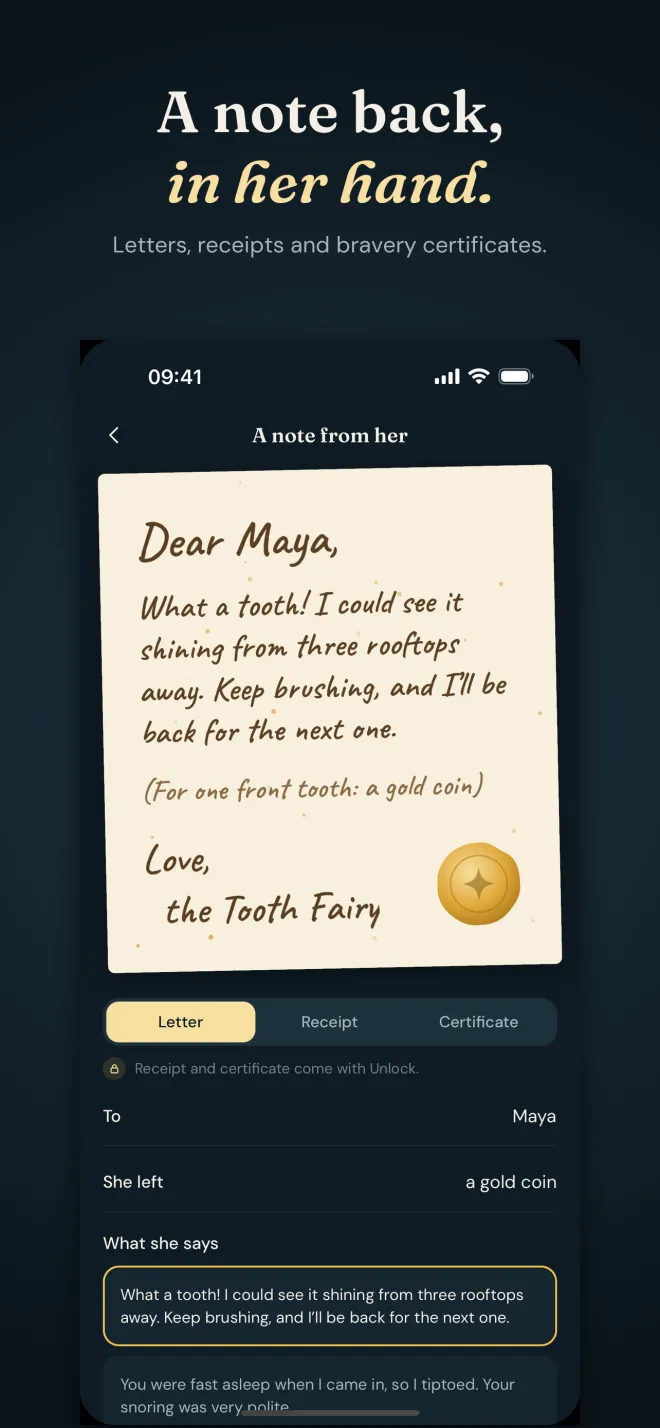
- Leave a note backWrite a letter from the Tooth Fairy with your child's name and what she left, sealed with gold wax, and mark the tooth on the tooth map.
What it does
✨She glows into the room
A soft light and a trail of sparkle dust spill into the photo around her, so she looks like part of the picture.
📹Night-vision camera look
Green night-camera footage with film grain, a REC light, a camera number and a timestamp set in the small hours of tonight.
👆Preview mode
She streaks in across the full screen, hovers, and darts off when your child taps.
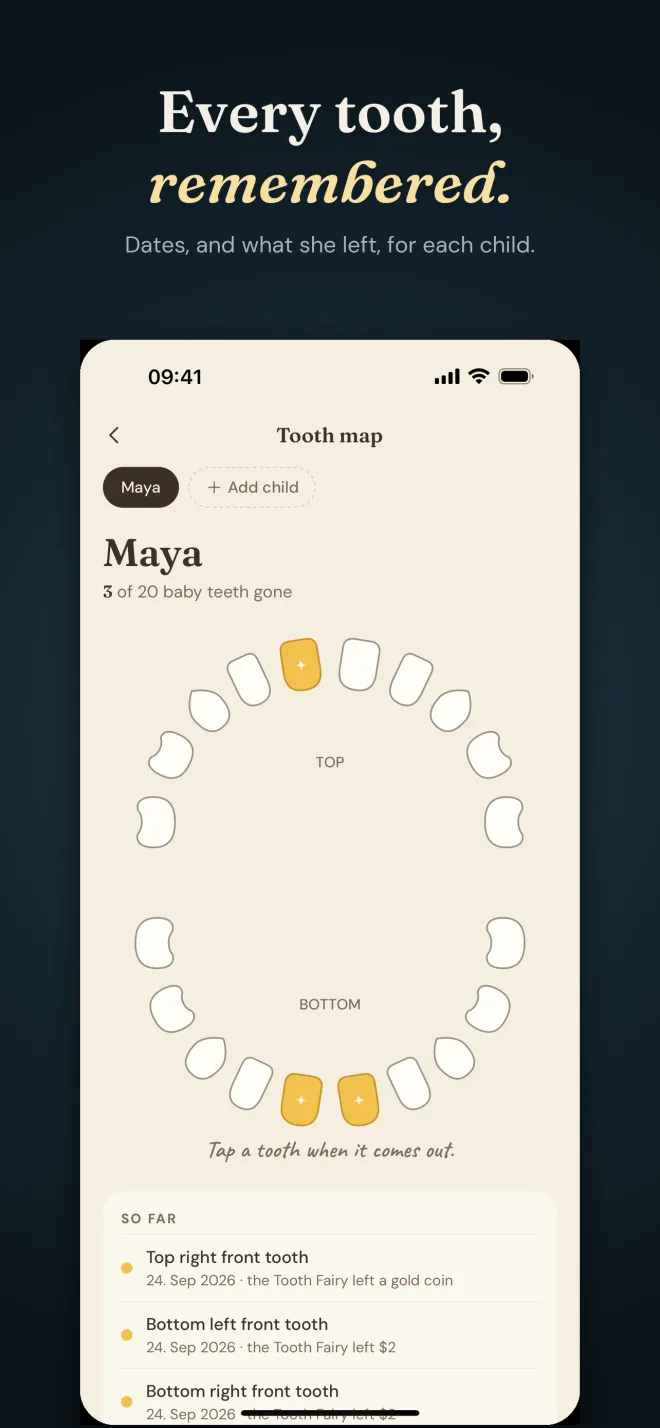
🦷Tooth map
Charts all 20 baby teeth. Tap a tooth when it comes out to record the date and what the Tooth Fairy left. One map per child.
✉️A letter in her handwriting
A note with your child's name and what she left, sealed with gold wax. Save it to Photos to print, or share it.
🎅Other visitors
With the unlock: Santa, the Easter Bunny, the Leprechaun and a Christmas Elf, each with their own poses.
Questions parents ask
How do I catch the Tooth Fairy on camera?
You make the photo yourself after your child is asleep. Take a picture of the bedroom, place the glowing Tooth Fairy into it in Tooth Fairy Cam, and switch on the Night vision look with the REC light and a timestamp in the small hours. In the morning, show the photo, or play Preview so she flies across the screen.
Is there a tooth fairy picture app that doesn't look fake?
The usual giveaway is a cut-out pasted on top of a photo. Tooth Fairy Cam spills a soft light and a trail of sparkle dust into the room around her, and lets you tune the glow, trail length and motion blur, so she sits inside the scene. A dim photo and the night-vision look help too.
What can I leave as proof the Tooth Fairy came?
Besides the photo, the app writes a letter from the Tooth Fairy with your child's name and what she left, in her handwriting and sealed with gold wax. With the unlock you can also make a Tooth Fairy receipt and a certificate of bravery. Save them to Photos to print.
How do I keep track of which baby teeth have come out?
The Tooth map charts all 20 baby teeth. Tap a tooth when it comes out to record the date and what the Tooth Fairy left, and keep a separate map for each child in the family.
Can I catch Santa or the Easter Bunny on camera too?
Yes, with the one-time unlock. It adds Santa, the Easter Bunny, the Leprechaun and a Christmas Elf, each with their own poses, plus the Hallway cam look.
Tooth Fairy Cam vs editing a photo yourself
You can paste a fairy into a photo with any photo editor, but making the light fall into the room and faking a security-camera look takes time and skill. Many fairy photo apps place a flat sticker on top.
| Tooth Fairy Cam | A general photo editor | Sticker-style fairy apps | |
|---|---|---|---|
| Glow and sparkle that spill into the room | ✓ | Possible, takes skill | Varies |
| Night-vision look, REC light and timestamp | ✓ | ✗ Do it by hand | Varies |
| Animated preview she flies out of | ✓ | ✗ | Varies |
| Tooth map and handwritten letters | ✓ | ✗ | Varies |
| Photos stay on your iPhone | ✓ | Depends on the app | Varies |
| Price | Free, US $3.99 once for everything | Varies | Often ads or a subscription |
Frequently asked questions
Is Tooth Fairy Cam free?
Yes. Free: the Tooth Fairy in three poses, the night vision and natural looks, the Tooth map for every child, and handwritten letters. One payment (US $3.99, no subscription) unlocks Santa, the Easter Bunny, the Leprechaun and a Christmas Elf, three more Tooth Fairy poses, the Hallway cam look, receipts and certificates of bravery, and removes the banner ad.
Are there ads?
The free version shows one small banner on the home and settings screens only, never while you edit or while your child watches the preview. The ads are non-personalized and the app never asks to track you. The unlock removes the banner.
Are my photos uploaded anywhere?
No. Photos never leave your iPhone. There is no account and nothing is uploaded. Your pictures, each child's tooth map and your letters are kept in the app's storage on your device.
Does it work offline?
Placing the fairy and the camera looks are done on your iPhone, and the app has no server of its own. Only the banner ad in the free version uses the internet.
Which languages does it support?
15: English, Spanish, French, German, Italian, Portuguese, Russian, Turkish, Indonesian, Vietnamese, Japanese, Korean, Simplified Chinese, Hindi and Arabic, with handwriting for the letters in each script.
How do I make the photo look real?
Take the photo in dim light from where a hidden camera would sit, then place the fairy near a window, lamp or the pillow. Lower the glow for a subtle visit, or turn on the Night vision look with the timestamp for a security-camera feel.
Can I add more than one child?
Yes. Open Tooth map and tap Add child. Each child keeps their own chart, dates and notes.
Is there an Android version?
There is no Android version yet. Tooth Fairy Cam is iPhone-only for now.
More on-device apps for chat exports and voice notes
Tooth Fairy Cam adds an illustrated character to your own photos for family fun. The photos are made by you on your iPhone and are not real camera footage.