How to Add an MCP Server to Claude Code, Claude Desktop, Cursor and Codex (Config Files Explained)
Where each AI client keeps its MCP config — claude_desktop_config.json, ~/.claude.json, ~/.cursor/mcp.json and Codex's config.toml — with copy-paste examples, the claude mcp add command, and fixes for servers that won't load.
Every MCP client stores its servers in a different file with a slightly different shape, and almost every "my MCP server doesn't show up" problem comes down to one of three things: the wrong file, a broken JSON comma, or a node that the client can't find. This guide is the reference I wish I'd had: where each client keeps its config, what the entry looks like, and how to debug it.
I'll use Weft as the running example — it turns websites you're logged into into an MCP server — but every snippet works for any stdio MCP server: swap the command and arguments for your own.
The anatomy of an MCP server entry
A local (stdio) MCP server is just a command the client starts and talks to over stdin/stdout. Every config boils down to three things: a name, a command, and its arguments (plus optional environment variables):
{
  "mcpServers": {
    "weft": {
      "command": "node",
      "args": ["/Applications/Weft.app/Contents/Resources/mcp-shim/index.js"]
    }
  }
}
Remote servers (Streamable HTTP) use a url instead of a command; how the protocol's transports differ is covered in MCP Architecture Explained.
Add an MCP server to Claude Code
The quickest way is the CLI. --scope user makes the server available in every project; without it, it's added to the current project only:
claude mcp add --scope user weft -- node /Applications/Weft.app/Contents/Resources/mcp-shim/index.js

# check it
claude mcp list
User-scope servers live in ~/.claude.json under mcpServers, in the same shape as above. Project-scope servers you want to share with your team go in a .mcp.json file at the repo root. Inside a session, run /mcp to see each server's connection status and tools. MCP servers load when a session starts, so start a new session after adding one.
Add an MCP server to Claude Desktop (claude_desktop_config.json)
Claude Desktop reads claude_desktop_config.json. You can open it from Settings → Developer → Edit Config, or directly:
- macOS:
~/Library/Application Support/Claude/claude_desktop_config.json - Windows:
%APPDATA%\Claude\claude_desktop_config.json
Add your server under mcpServers (create the file with { "mcpServers": {} } if it doesn't exist), then fully quit Claude Desktop — from the menu bar on macOS, the system tray on Windows — and reopen it. Closing the window isn't enough; the config is only read at startup.
Add an MCP server to Cursor (~/.cursor/mcp.json)
Cursor reads ~/.cursor/mcp.json for global servers and .cursor/mcp.json inside a project for project-only ones. Same mcpServers shape as Claude Desktop. After saving, open the MCP section of Cursor Settings: each server shows a status indicator and its tool list.
Add an MCP server to Codex (~/.codex/config.toml)
Codex uses TOML. Each server is a [mcp_servers.<name>] table:
[mcp_servers.weft]
command = "node"
args = ["/Applications/Weft.app/Contents/Resources/mcp-shim/index.js"]
Or skip the config files entirely
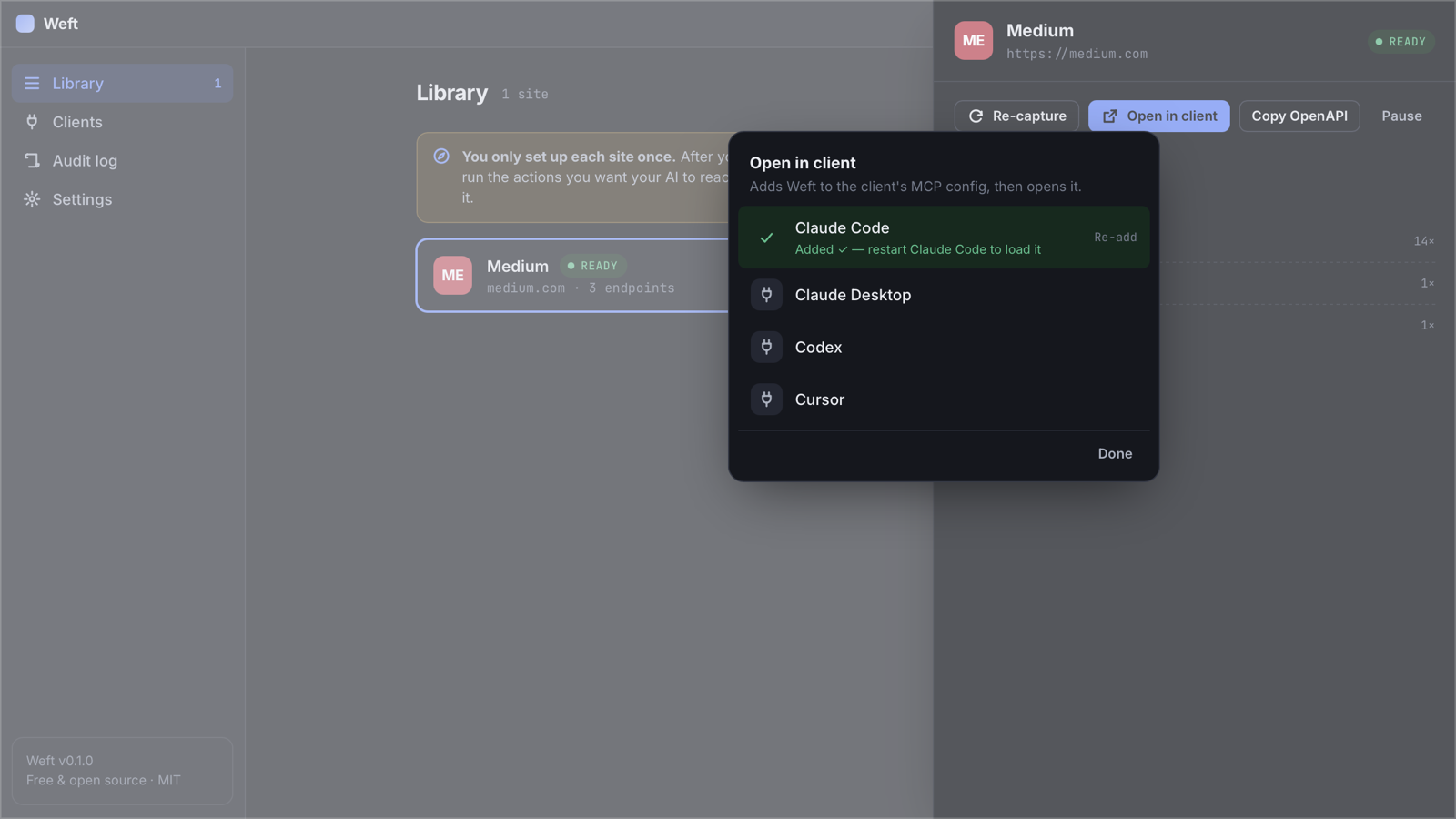
If the server you're adding is Weft, you don't need any of the above: on a ready site, click Open in client and pick Claude Code, Claude Desktop, Codex or Cursor. Weft reads the existing config, adds or updates only its own weft entry, writes it back, and opens the client if it's a desktop app.
MCP server not showing up? Fix list
- Restart properly. Every client reads MCP config at startup. Claude Code: new session. Claude Desktop and Cursor: quit from the menu bar/tray and reopen.
- Validate the JSON. One trailing comma breaks the whole file. Run
python3 -m json.tool < claude_desktop_config.jsonto find it. - Use an absolute path to `node`. Desktop apps don't inherit your shell's
PATH, so anodeinstalled by nvm, fnm or Volta often isn't found. Use the full path fromwhich node. (Weft's one-click install does this for you.) - Use absolute paths in `args`. There's no reliable working directory for a server started by a GUI app.
- Never print to stdout in a stdio server. stdout is the protocol channel; logs belong on stderr. It's the most common bug when you write your own — see Building MCPs in TypeScript.
- Check the logs. Claude Desktop writes per-server logs (on macOS under
~/Library/Logs/Claude/); Claude Code shows errors in/mcp.
Frequently asked questions
Where is claude_desktop_config.json?
On macOS it's ~/Library/Application Support/Claude/claude_desktop_config.json, and on Windows %APPDATA%\Claude\claude_desktop_config.json. You can also open it from Claude Desktop's Settings → Developer → Edit Config.
How do I add an MCP server to Claude Code?
Run claude mcp add --scope user <name> -- <command> <args>, for example claude mcp add --scope user weft -- node /path/to/index.js, then start a new session and check it with /mcp.
Why doesn't my MCP server appear after editing the config?
Usually the client wasn't fully restarted, the JSON has a syntax error, or the client can't find node because desktop apps don't inherit your shell PATH. Use absolute paths and fully quit and reopen the client.
Can one MCP server be used by several clients at once?
Yes. Each client starts its own copy of a stdio server. With Weft, every client's copy connects to the same running Weft app, so they share one endpoint map and one browser session.